Commercial invoices and credit memos
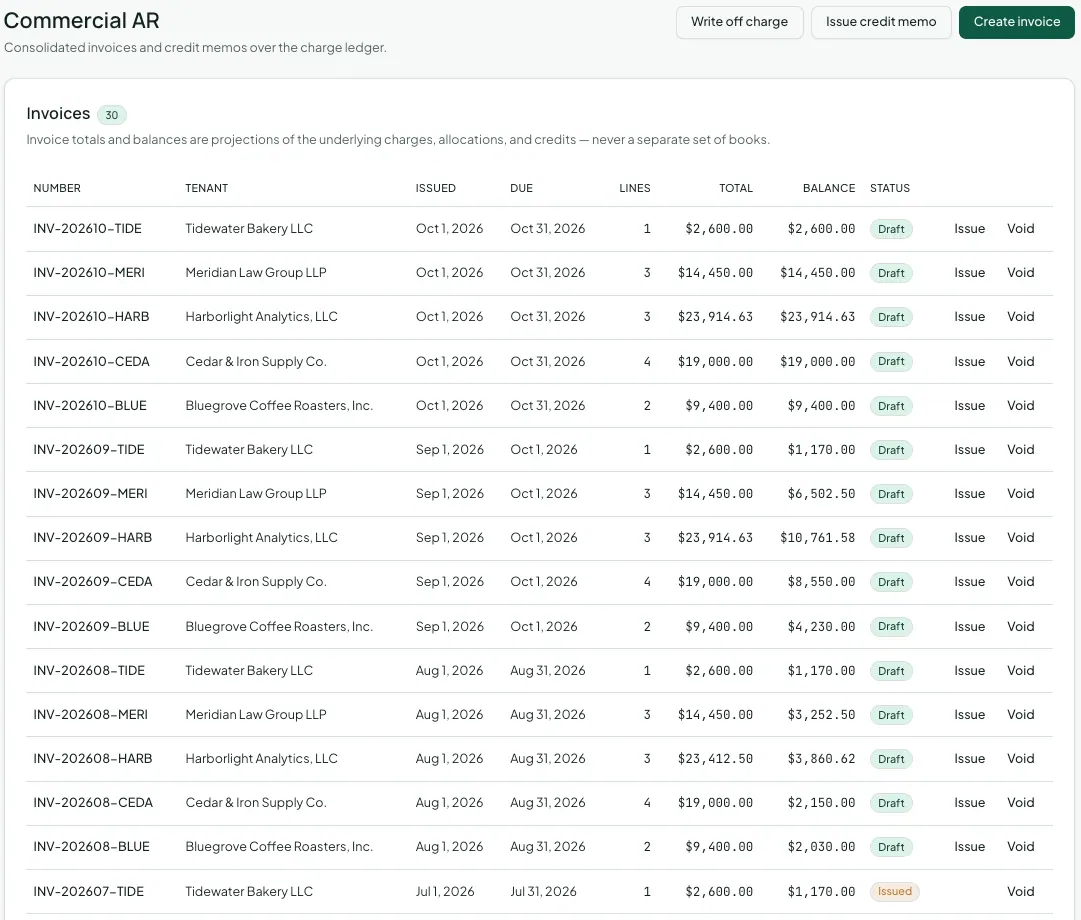
Commercial tenants expect an invoice. Go to Commercial > Commercial AR to create them, along with credit memos and write-offs.
Invoices in Vespy are a document over the tenant’s charges, not a second set of books. Every amount on an invoice is an existing charge: base rent from a billing schedule, a CAM true-up, percentage rent, a one-off charge. An invoice’s balance is always those charges’ balances after payments and credits. Paying, crediting, or writing off a charge updates every invoice it’s on.
1. Create an invoice
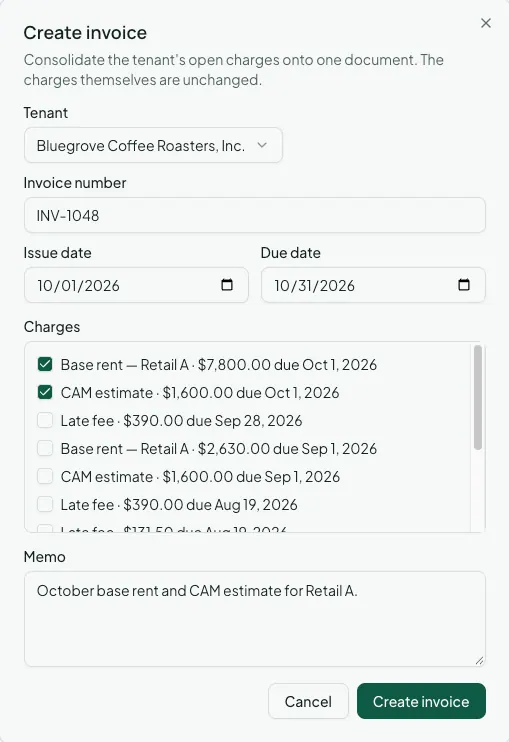
Section titled “1. Create an invoice”Click Create invoice and fill in:
- Tenant.
- Invoice number, such as
INV-202610-HARB. - Issue date and Due date.
- Charges: tick the tenant’s open charges to include. This can span all of the tenant’s leases, so a company with three suites in two buildings gets one invoice. A charge can only appear on one invoice.
- Memo (optional), printed on the invoice.
New invoices start as Draft. Click Issue when it’s ready to send. Void withdraws an invoice. The charges on it are not changed and are still owed.
2. Issue a credit memo
Section titled “2. Issue a credit memo”A credit memo is money the tenant has to its credit until you apply it against a charge.
Vespy issues some memos for you: when an
amendment lowers rent for
months already billed, or a recovery reconciliation
finds the tenant overpaid. Memos are numbered CM-<year>-<number>, and the Source
column shows where each one came from.
To issue one yourself, for a concession or a billing correction, click Issue credit memo and enter the Tenant, the income Category being credited, the Issue date, the Amount ($), and a Reason.
3. Apply a credit
Section titled “3. Apply a credit”Click Apply on a memo, pick the Charge to apply it to, and the Amount ($). A memo can be split across several charges, and its status moves from Issued to Partially applied to Applied as it’s used up.
Applying a credit is always a deliberate step, never automatic, so you decide which charge a credit settles. Void cancels a memo that hasn’t been applied to anything yet.
4. Write off a charge
Section titled “4. Write off a charge”When a charge won’t be collected, click Write off charge, pick the Charge, and give a Reason. Its balance is cleared to bad debt expense, and the reason is kept on the ledger.
Afterwards
Section titled “Afterwards”- Commercial reports — Commercial AR Aging shows what’s outstanding by tenant and how overdue it is.
- Billing rent and collecting payments — how tenants pay, online or recorded by hand.