Rent escalations and index values
Most commercial leases raise rent on a schedule: 3% every lease anniversary, $1.00 per square foot a year, or in line with CPI. You could type every future rent step by hand, but an escalation rule writes each one for you on the day it takes effect, so the lease can’t miss a bump.
An escalation rule only ever adds the next step to a billing schedule. It never changes rent that’s already on the schedule, and it never bills a month twice.
1. Add an escalation rule
Section titled “1. Add an escalation rule”Open the lease, go to the Escalations & sales tab, and click Add rule on the Escalation rules card. Choose:
- Billing schedule: usually Base rent. The rule increases from that schedule’s latest step.
- Method:
- Fixed percent: enter the Increase (%).
- Fixed amount: enter how much each increase adds, per month for a fixed-amount schedule or per square foot per year for a per-square-foot one.
- Index-linked: enter the Index code (such as
CPI-U) and the Index base period, the month whose reading the first increase is measured from.
- Floor (%) and Cap (%) (optional): the smallest and largest increase allowed, for percent and index-linked rules. A CPI clause like “CPI, but not less than 2% or more than 5%” is an index-linked rule with a 2% floor and a 5% cap.
- Frequency (months):
12for an annual increase. - Next effective date: the date the next increase takes effect.
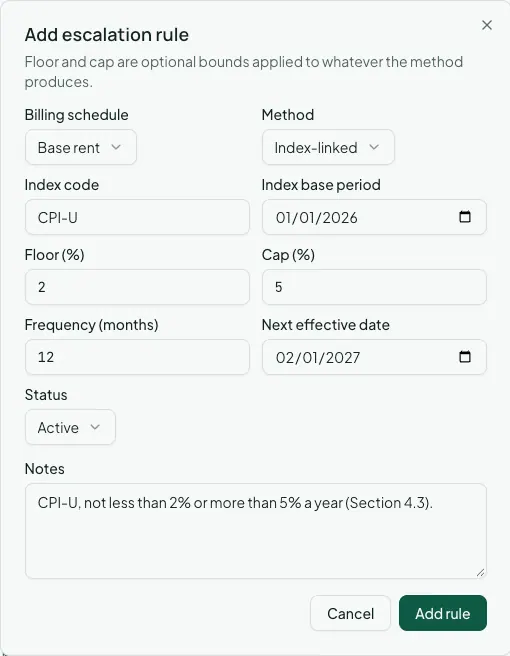
Each morning, before rent is billed, every active rule whose next effective date has arrived closes the schedule’s current step the day before, adds a new step at the increased amount, and moves its own next effective date forward by the frequency. The new step’s description notes the escalation that wrote it.
A next effective date in the past is fine: each increase since then is added on the next run, and months already billed aren’t billed again. To apply due increases right away rather than waiting for the morning, click Run and choose an As of date. Run applies every due rule in your organization, not just this lease’s.
2. Record index values
Section titled “2. Record index values”Index-linked rules need the index readings to calculate from. Go to Commercial > Index Values and click Record value for each published reading:
- Index code: the same code the rules use, such as
CPI-U. - Period: the month the reading is for.
- Value: the published index level, such as
328.8. - Source (optional): where it came from, for the audit trail.
Recording a value for an index and period that already has one replaces the old reading.
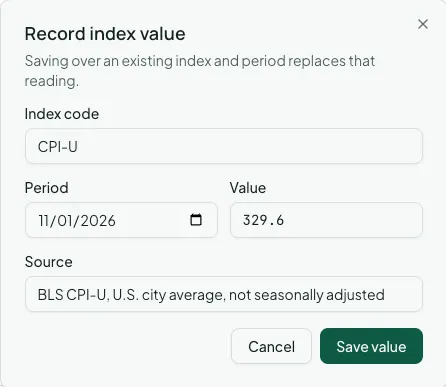
An index-linked increase is the change between two readings: the latest one on or before the increase’s effective date, divided by the base reading, minus one. The base is the index base period for the first increase, then the date of the previous increase after that. The result is held within the rule’s floor and cap.
If a reading the rule needs hasn’t been recorded yet, the rule waits and shows the missing period. Record the value and the increase applies on the next run.
Afterwards
Section titled “Afterwards”- Amendments, options, and critical dates — for rent changes the lease’s own escalation clause doesn’t cover.
- Percentage rent and tenant sales — the other half of the Escalations & sales tab.